




Table of Contents
ToggleA clogged Dyson vacuum filter is one of the quickest ways to kill suction and turn your premium appliance into an expensive paperweight. Most homeowners don’t realize that regular filter maintenance is just as important as emptying the bin, and it’s far simpler than you’d think. Whether you own a cordless Dyson model or an upright, the process takes less than 10 minutes once you know what you’re doing. This guide walks you through cleaning your Dyson vacuum filter step-by-step, explaining why it matters and how to keep your machine running at peak performance year-round.
Key Takeaways
- Regular Dyson vacuum filter cleaning every month prevents suction loss, extends filter lifespan, and avoids costly replacements that can degrade performance.
- A clogged filter forces your motor to work overtime, draining cordless battery faster and reducing cleaning power, making weekly inspections essential for optimal performance.
- The complete filter cleaning process takes less than 10 minutes: power off, remove the filter, tap out dust, rinse with lukewarm water, and allow 4-8 hours for complete drying before reinstalling.
- Watch for early warning signs like weak suction after emptying the bin, longer cleaning times, visible dust buildup, or unusual motor noise indicating your filter needs immediate cleaning.
- Use only lukewarm water and avoid detergents or heat sources like hair dryers when cleaning your filter, as these can damage the material and compromise airflow.
- Replace your Dyson vacuum filter after 12-18 months of regular use, even with proper maintenance, as worn filters can no longer restore suction effectively and may strain the motor.
Why Regular Filter Cleaning Matters For Your Dyson
Your Dyson cordless vacuum filter (or any Dyson model filter) traps dust, allergens, and fine particles before air exits the machine. Over time, these particles accumulate and create a layer of blockage that suffocates airflow. The result? Weak suction, reduced cleaning power, and your motor working overtime to compensate, which drains the battery faster on cordless models and puts stress on the system overall.
Regular cleaning extends the life of your Dyson vacuum cleaner filters dramatically. Most manufacturers recommend checking the filter weekly and cleaning it every month, depending on usage. If you have pets or live in a dusty environment, you may need to clean it more frequently. A simple monthly rinse prevents the need for expensive replacement filters and keeps your machine warranty-friendly.
Signs Your Filter Needs Cleaning
Don’t wait for complete suction failure. Watch for these early warning signs:
• Noticeably weaker suction even after emptying the dust bin
• Longer cleaning time to cover the same floor area
• Visible dust buildup on the filter surface when you look at it
• Unusual motor noise or the machine feeling hot during use
• Battery drains faster on cordless models during the same job
If you spot any of these, it’s time to pull out the filter and give it a rinse. The longer you wait, the more effort your vacuum expends just to push air through clogged fibers.
Gathering Your Supplies And Preparing Your Workspace
You won’t need much, and odds are you already have everything on hand. Here’s what to gather before you start:
What You’ll Need:
• Your Dyson vacuum
• Sink or bucket of lukewarm water
• Soft brush or old toothbrush (optional, for stubborn debris)
• Clean, lint-free cloth or paper towels
• Well-ventilated area or outdoor space (dust particles will dislodge during cleaning)
The beauty of dyson vacuum filter replacement maintenance is that it requires no special tools or chemicals. Plain water does the job perfectly, avoid detergents, which can degrade the filter material and leave residue that blocks airflow even more.
Set up your workspace near a sink or outdoors where dust won’t settle on your furniture. If you’re working indoors, open a window and maybe turn on a fan. When you tap and rinse the filter, loose particles fly everywhere, so a garage or patio is ideal. Grab a few paper towels to set down as your working surface, this catches any water drips and keeps cleanup quick.
Step-By-Step Filter Cleaning Instructions
Follow these five straightforward steps to restore your Dyson vacuum filters to working order:
1. Power Off and Unplug Your Vacuum
Always disconnect from power before opening any compartments. On cordless models, press the power button three times in quick succession to fully discharge the motor. Wait a few seconds before proceeding. Safety first, electrical components and water don’t mix.
2. Locate and Remove the Filter
On most Dyson models, the filter is housed in the main body near the motor head. Look for a release button or twist-lock mechanism (check your user manual if unsure). Gently pull or twist to release. Don’t force it, if it’s stuck, give it a light tap to loosen accumulated dust around the seals.
3. Tap Out Loose Dust
Hold the filter over a trash can and tap it gently but firmly against the sides. You’ll see a cloud of dust come loose. Rotate it as you tap to dislodge particles from all angles. This step alone removes 80% of the buildup and is crucial before rinsing.
4. Rinse Under Lukewarm Running Water
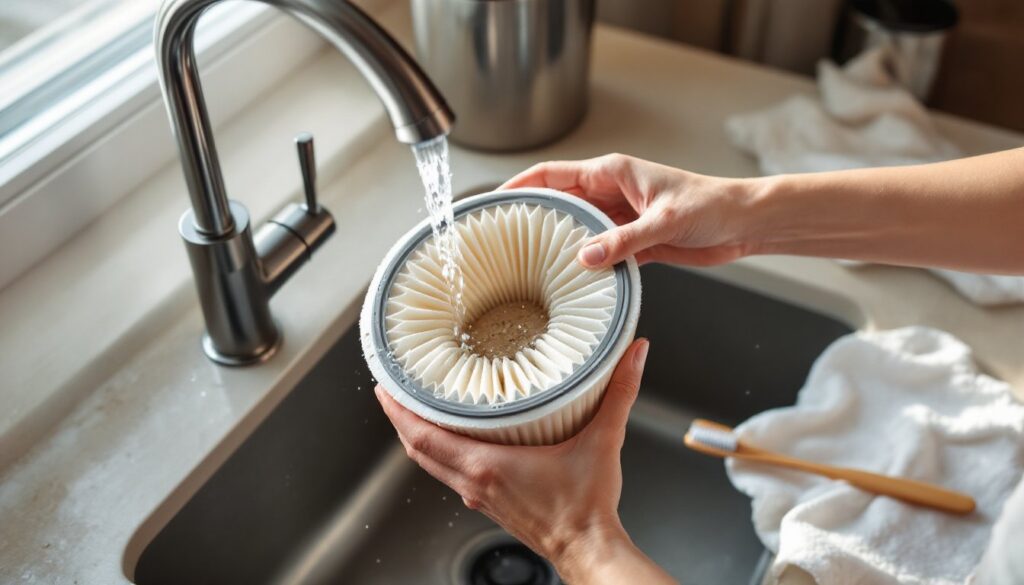
Hold the filter under a gentle stream of lukewarm water, not hot, which can damage the fibers. Run water through the filter from the inside out (not against the grain of the pleats). Let the water flow for 20–30 seconds. If the filter looks really dirty, repeat this process. A soft brush can gently scrub the outside pleats, but avoid harsh scrubbing that damages the material. According to experts at Good Housekeeping, this gentle approach is how to clean a Dyson vacuum filter without reducing its lifespan.
5. Inspect and Set to Dry
Hold the filter up to a light source and look for remaining dirt. You should see light passing through the entire filter surface. If it still looks clogged, repeat the rinse. Once satisfied, set it upright on a clean cloth in a warm, dry area. Some homeowners stand it on end in a cup so air circulates all around it.
Drying And Reinstalling Your Filter Properly
This is where patience matters. Never reinstall a wet filter, doing so defeats the purpose and can damage the motor. The filter must be completely dry, which typically takes 4–8 hours depending on humidity and airflow in your home.
If you’re in a hurry, place the filter in a warm room (not directly in sunlight, which can warp plastic components) and position a fan nearby to speed drying. Skip the temptation to use a hair dryer or heat gun: the concentrated heat can melt the filter material or damage seals.
Once the filter is bone-dry, reinstall it by reversing the removal process. Align it with any guide rails, then push or twist into place until you hear a click or feel resistance, don’t force it. Your machine should feel secure with no gaps around the filter housing.
Turn the vacuum on briefly with the bin empty to confirm normal suction and motor sound. If something feels off, power down and reseat the filter. Proper installation is just as important as cleaning. According to Today’s Homeowner, this final step ensures your machine delivers the performance you paid for.
Maintenance Tips To Extend Filter Lifespan
Cleaning is preventive maintenance, but you can stretch the life of filters for Dyson vacuum cleaners even further with smart habits:
Monthly Schedule
Mark your calendar for the first of each month (or every four weeks) to do a quick filter inspection. This habit catches buildup before it becomes a problem.
Use the Right Attachment
For high-dust jobs like basement cleanup or post-construction sweeping, use a Dyson vacuum cleaner filters with a pre-filter or secondary filter if your model includes one. This redirects larger debris away from your main filter.
Empty the Bin Frequently
Don’t wait until it’s full. A stuffed bin creates back-pressure that forces air and fine particles through the filter faster. Empty at 50–75% capacity, especially during heavy-use days. This simple habit reduces filter strain significantly.
Know When to Replace, Not Just Clean
After 12–18 months of regular use, even a well-maintained filter loses efficiency. When cleaning no longer restores suction the way it used to, that’s your signal to replace it. According to CNET, investing in a genuine replacement filter rather than trying to stretch a worn one actually saves money by protecting your motor.
Store Properly
If you’re storing a Dyson for winter or an extended period, make sure the filter is completely dry before sealing the machine. Damp filters invite mold growth and odors.
Conclusion
Cleaning your Dyson vacuum filter is one of the easiest maintenance tasks that pays enormous dividends. Five minutes of monthly work keeps your machine running at full strength, extends its lifespan, and saves you money on premature replacements. Make it a habit, stay consistent, and your Dyson will reward you with reliable suction for years to come. Your home will thank you too, a clean filter means better air quality with fewer dust particles recirculating into the air you breathe.